🎯 Part I — Custom YOLOv8 Object Detection (Fine-Tuned)

Custom Object Detection & Tracking: Fine-Tuning YOLOv8 for Edge Robotics

A complete, end-to-end machine learning pipeline — from raw video capture to real-time inference on a conveyor belt robotic system.

Python YOLOv8 / Ultralytics OpenCV Roboflow Google Colab ByteTrack
🎥
Frame Extraction
🏷️
Annotation
🔀
Augmentation
🧠
Fine-Tuning
📊
Evaluation
🤖
Deployment
01 — Context & Objective

Fine-Tuning YOLOv8 for Real-Time Conveyor Belt Tracking

Two-Part Vision System (Part I of II) This project is the foundational component of a two-part edge vision system. While Part I (this page) focuses on custom dataset creation, Roboflow annotation, and YOLOv8 fine-tuning, Part II layers advanced tracking and OpenCV spatial boundaries on top of the model. Explore 📦 Part II — Multi-Object Tracking & Spatial Logic.

The end goal of this project is to feed a robotic arm: a vision system that can detect, classify, and track custom wooden objects moving on a physical conveyor belt, at real-time inference speeds, and with sufficient positional accuracy to guide pick-and-place operations. The conveyor belt system is fully 3D printed in PETG, utilizing a modular, open-source design from MakerWorld.

The target objects for recognition are the wooden game pieces from the Catan board game (see reference image below). These four custom object classes — Church, House, Bar, and Dice — are non-standard, small-scale, and visually similar in certain lighting conditions. No existing pre-trained model has ever seen them. This rules out any zero-shot approach and demands a purpose-built, fine-tuned model.
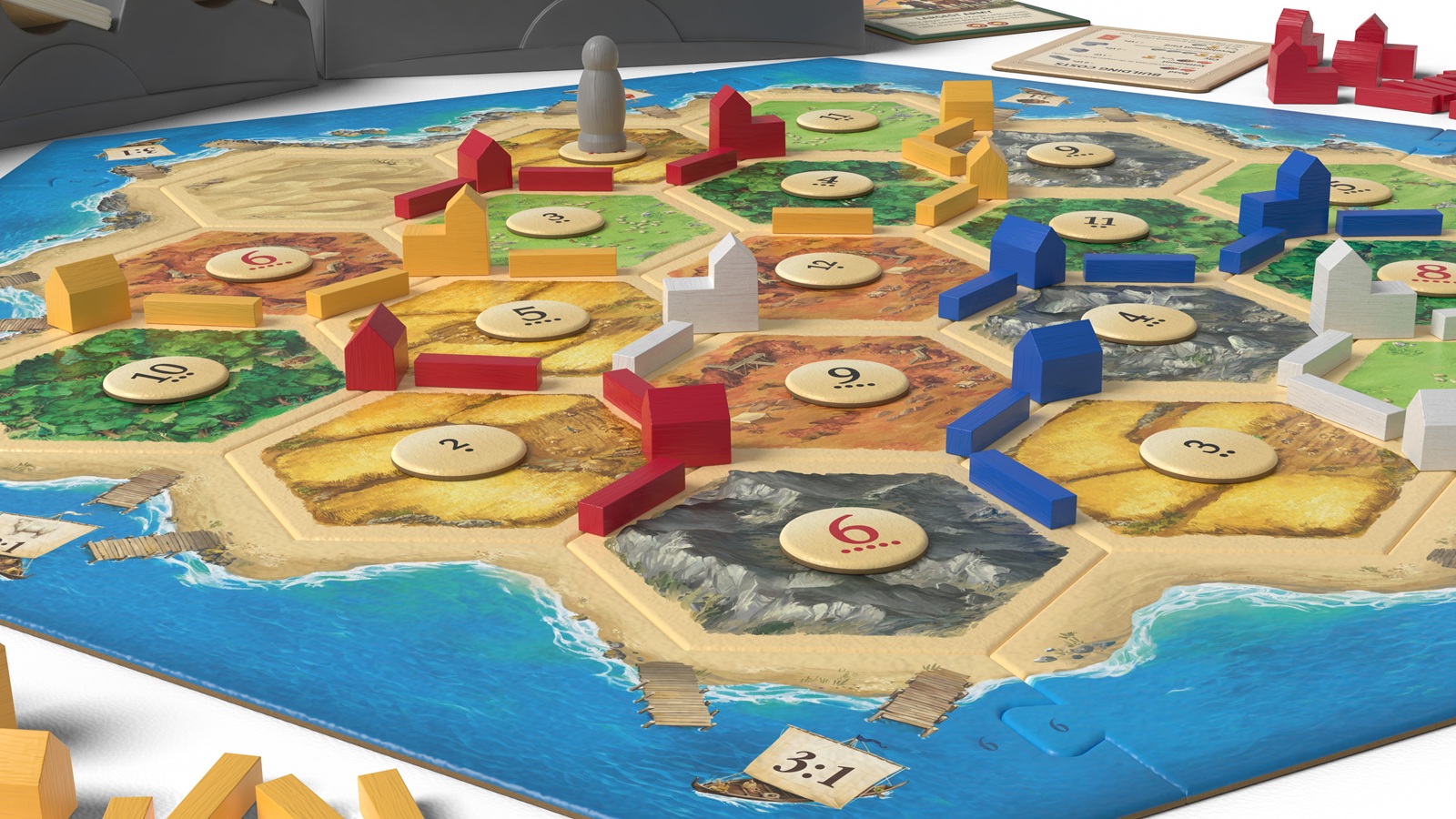
Catan board game showing the wooden game pieces

Reference: The Catan board game. The target wooden pieces (Church, House, Bar) are scattered across the board.
Project Objective Build a robust, high-speed computer vision model capable of detecting, classifying, and tracking custom wooden shapes on a moving conveyor belt to guide a robotic arm — using the smallest viable YOLO architecture for edge deployment.
4
Custom Classes
100
Training Epochs
~97%
mAP@50 Achieved
02 — The Baseline Problem

Zero-Shot Limitations of Pre-Trained YOLOv8

The first step of any robust ML project is establishing a baseline — understanding exactly what the off-the-shelf model cannot do. Running the base YOLOv8n (Nano) model on our conveyor belt scene produced spectacularly wrong results.

The model — trained on COCO's 80 generic classes — had no concept of a "Church" shaped wooden block. Instead, it mapped visual features to the nearest object in its training distribution, confidently misclassifying the wooden shapes as "scissors," "surfboards," and "knives." A human hand in the scene was tagged as a "person." Bounding boxes were erratic, appearing and disappearing frame-to-frame with no temporal consistency.

Key Insight Pre-trained models are highly capable within their training distribution, but they cannot generalize to domain-specific, custom object classes without targeted fine-tuning on representative data. Zero-shot performance on this task was 0% useful accuracy.

Baseline inference using pre-trained YOLOv8n. Note the severe misclassifications ("scissors", "surfboard") and erratic, temporally inconsistent bounding boxes.

03 — Dataset Creation & Annotation

Building a Custom Dataset from Scratch

With no existing dataset for these objects, the entire training corpus had to be built from scratch. The approach was pragmatic: capture video of the actual physical setup — same lighting, same camera angle, same conveyor belt surface — and extract frames at a rate that captures sufficient class diversity without redundancy.

Frames were extracted from a recording of the actual conveyor belt scene. This ensures the model trains on the exact domain it will be deployed in — a critical practice that eliminates domain shift between training and inference.

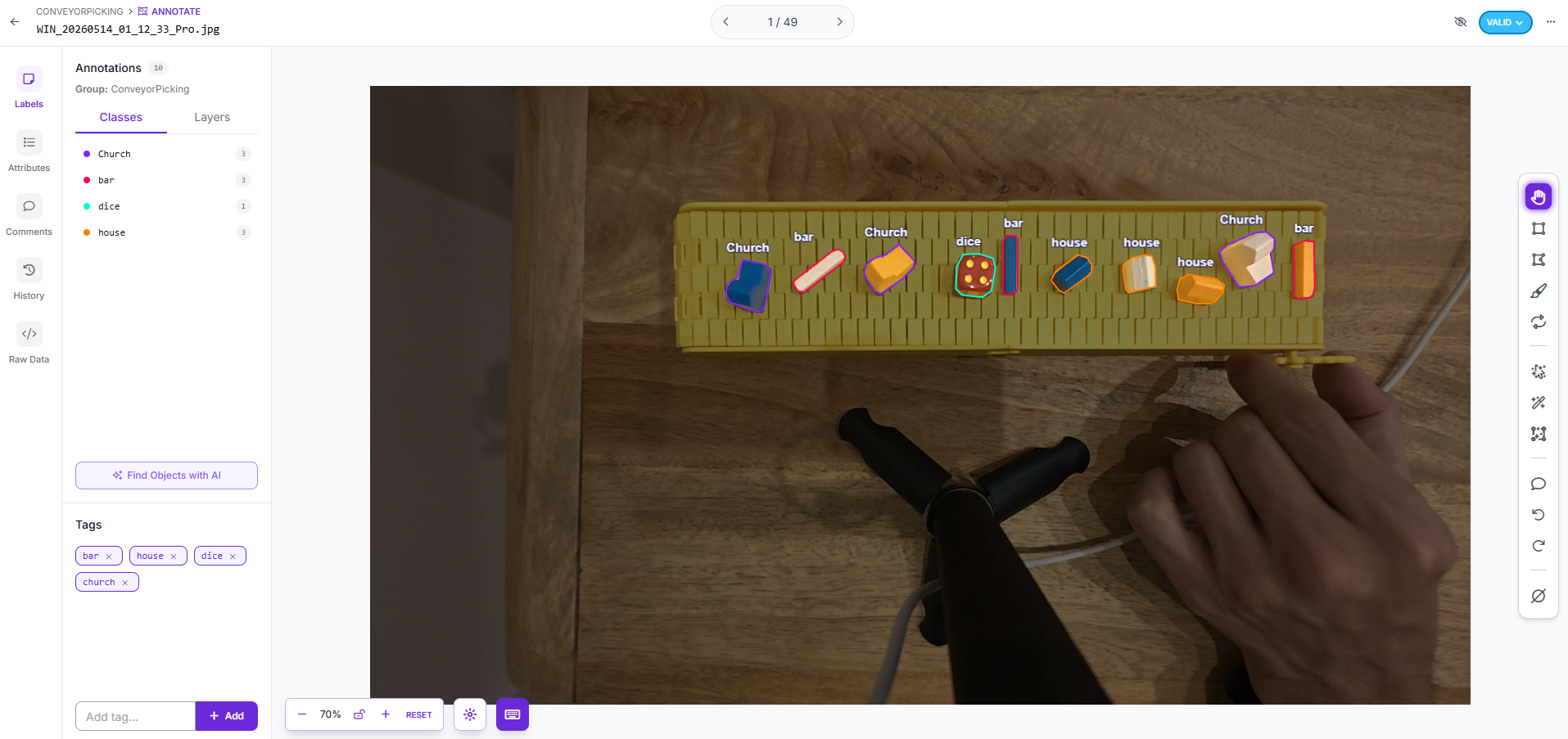
The raw frames were imported into Roboflow, where each object instance was manually annotated by drawing precise bounding boxes and assigning class labels. Each annotation becomes a ground truth data point that the model learns to replicate.

Roboflow annotation interface showing bounding boxes on conveyor belt objects

Manual bounding box annotation of custom classes (Church, Bar, Dice, House) within Roboflow. Each shape required individual labeling across all collected frames.

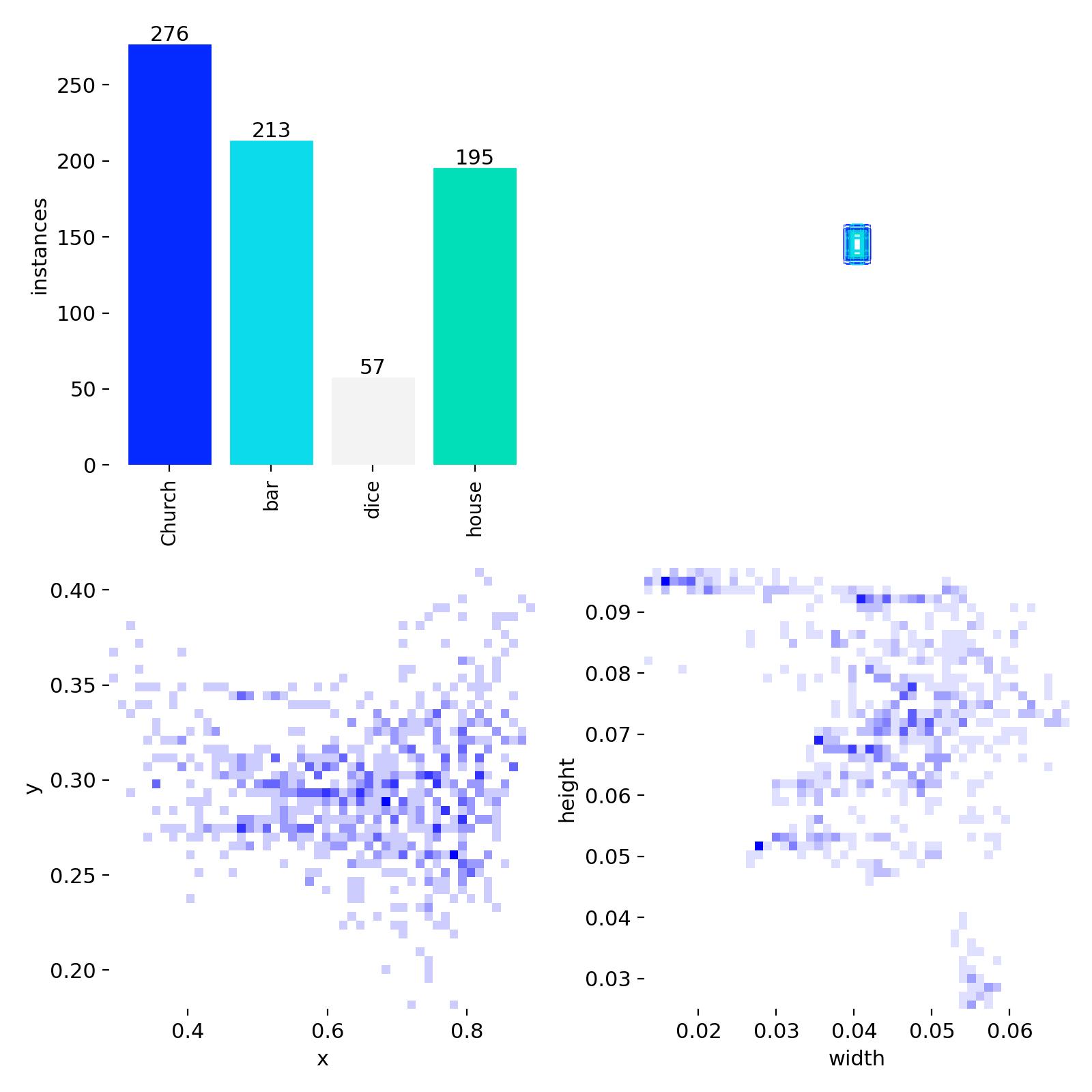
Dataset label distribution chart showing class balance and bounding box dimensions

Dataset label distribution: Church (276), Bar (213), House (195), Dice (57). The Dice class imbalance was partially addressed through augmentation.

Dataset Composition 741 total annotated instances across 4 classes. The dataset reflects realistic object distribution on the conveyor, including partial occlusions and objects near the belt edges.
04 — Data Augmentation Strategy

Simulating Real-World Physical Constraints

A fundamental challenge in custom dataset training is overfitting: a small dataset causes the model to memorize training examples rather than learning generalizable features. The solution is data augmentation — synthetically expanding the dataset by applying controlled transformations.

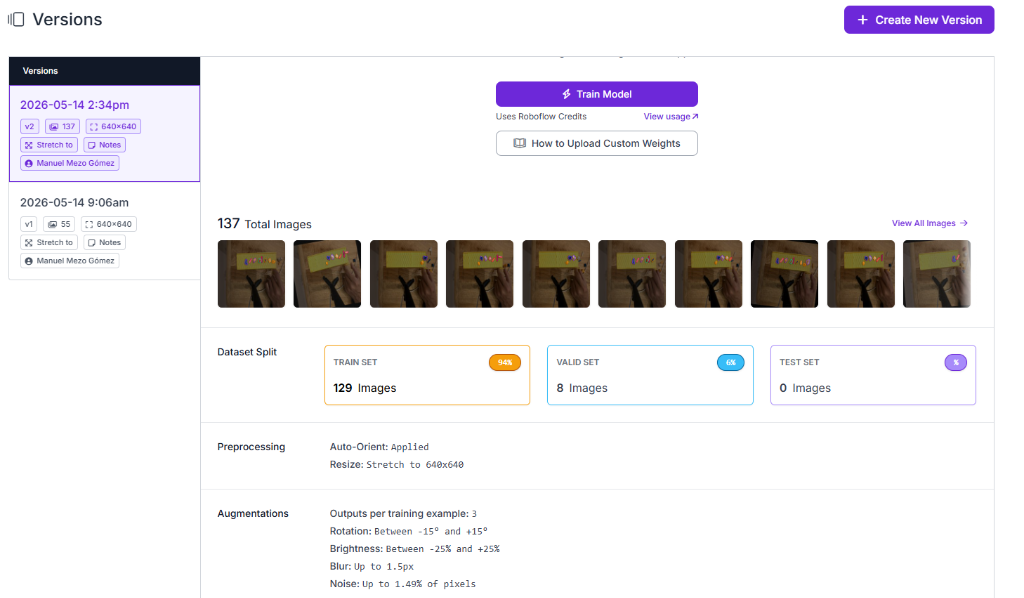
To ensure robust generalizations, the augmentation and preprocessing strategy was configured directly in Roboflow to mirror the specific physical constraints of the physical conveyor belt environment:

Roboflow dataset version configuration dashboard

Roboflow Dataset v2 configuration dashboard showing preprocessing parameters, augmentation limits, and the 94% / 6% training-to-validation split.

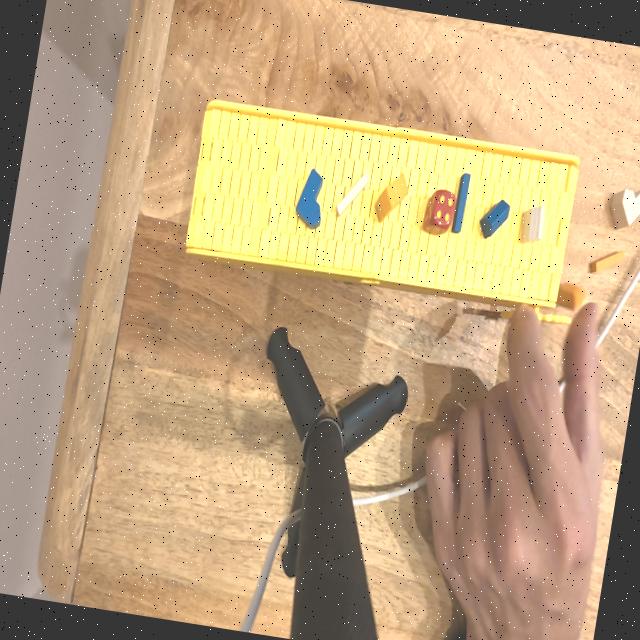
Example augmented training image showing noise and motion blur applied to conveyor belt scene

Generating synthetic training data using noise and motion blur augmentations. The dark vignette and grain simulate low-light and motion conditions on the physical belt.

05 — Model Training & Evaluation

Fine-Tuning with Ultralytics YOLOv8

Training was executed on Google Colab using a GPU runtime, leveraging the Ultralytics YOLOv8 framework. The chosen architecture was YOLOv8 Nano (YOLOv8n) — the smallest model in the YOLO8 family, deliberately selected to maximize inference speed on the target edge hardware while still achieving sufficient accuracy for the task.

# Fine-tuning command (Ultralytics CLI)
yolo task=detect mode=train \
    model=yolov8n.pt \
    data=dataset.yaml \
    epochs=100 \
    imgsz=640 \
    batch=16 \
    patience=20

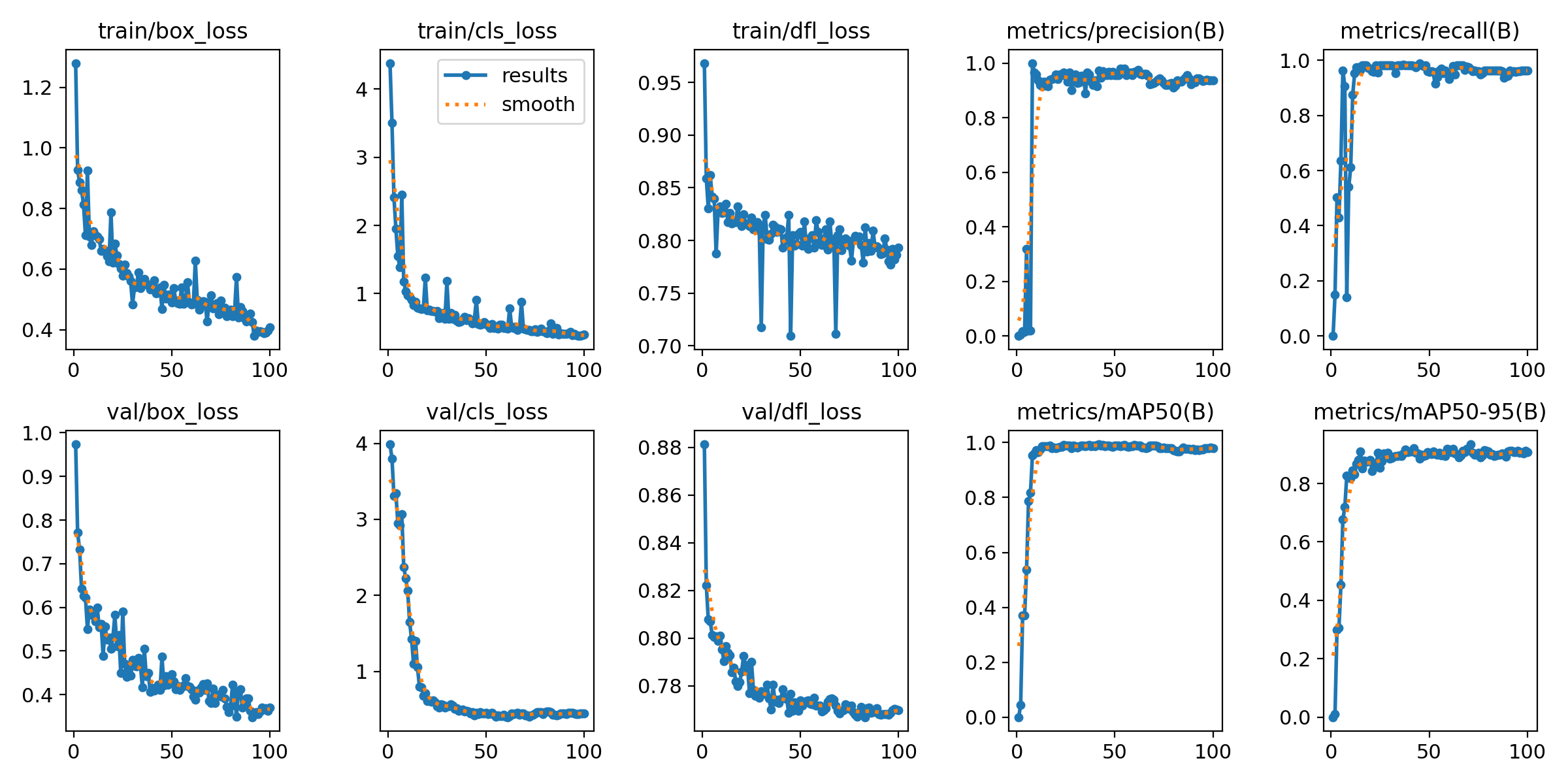
The training curves tell a clear story: both training and validation losses (box, classification, DFL) converge rapidly within the first 20 epochs and stabilize with no signs of divergence or overfitting. Precision and Recall climb to near-ceiling values. The mAP@50 reaches ~97% and mAP@50-95 exceeds 90%, indicating robust detection across a range of IoU thresholds.

YOLOv8 training metrics showing loss curves and mAP over 100 epochs

Training results over 100 epochs. Rapid convergence of classification and box loss; mAP@50 stabilises above 0.97.

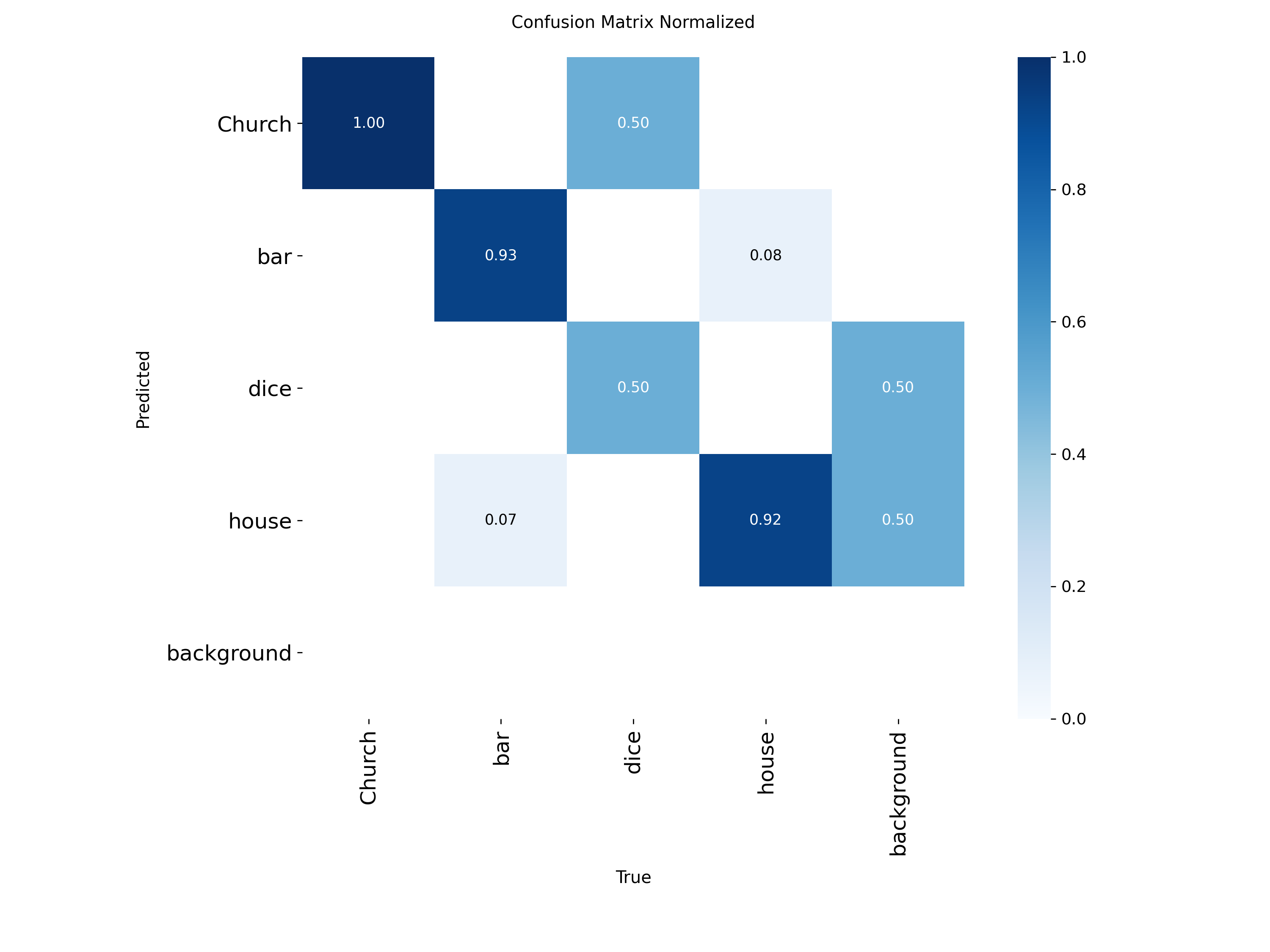
Normalized confusion matrix showing per-class detection accuracy

Normalized Confusion Matrix. Church: 1.00, Bar: 0.93, House: 0.92, Dice: 0.50 — the lower Dice score reflects class imbalance (57 vs 195–276 instances for other classes).

Reading the Confusion Matrix Church achieves perfect recall (1.00). Bar and House score 0.93 and 0.92 respectively — excellent for a small custom dataset. The Dice class at 0.50 is expected given only 57 training instances; its confusion with the background indicates it needs more training data in the next iteration, not a model architecture change.
1.00
Church Recall
0.93
Bar Recall
0.92
House Recall
Open-Source Project Repository & Notebooks All source files, Jupyter Notebooks, and training weights for this custom fine-tuning model are open-sourced on GitHub at vision-yolo-finetune. Specifically, this repository provides:
  • Google Colab Notebook: The fully documented Jupyter/Colab notebook used to set up the environment, import the Roboflow dataset, and fine-tune YOLOv8 on our 4 custom shape classes.
  • Local Inference Script: A standalone production script used to execute the trained YOLOv8 model locally on a live camera video feed to test, debug, and validate inference accuracy and real-time latency before deployment.
06 — Deployment & Multi-Object Tracking

Real-Time Inference with Persistent Object IDs

The fine-tuned .pt weight file was deployed locally using OpenCV for camera feed capture and the Ultralytics inference API for frame-by-frame detection. The key upgrade over basic detection is the addition of a multi-object tracking algorithm.

Rather than detecting objects independently in each frame (which produces flickering boxes and no temporal consistency), a tracking algorithm like ByteTrack assigns a persistent tracking ID to each detected object across frames. This means the system knows that object #3 (a "House") at position X in frame 150 is the same object at position X+5 in frame 151 — enabling trajectory prediction and confident hand-off to the robotic arm controller.

# Inference with tracking
from ultralytics import YOLO
import cv2

model = YOLO("best.pt")  # fine-tuned weights
cap = cv2.VideoCapture(0)  # webcam / camera feed

while cap.isOpened():
    ret, frame = cap.read()
    results = model.track(frame, persist=True, tracker="bytetrack.yaml")
    annotated = results[0].plot()
    cv2.imshow("Conveyor Tracking", annotated)

Final deployed model. The fine-tuned YOLOv8n accurately classifies custom wooden objects, assigns persistent tracking IDs (blue text), and maintains high confidence scores even while the user interacts with the scene — demonstrating robustness to partial occlusion.

Next Steps Expand the Dice class dataset to 150+ instances to close the recall gap. Integrate positional output (bounding box centroid + class) with the robotic arm controller via serial/ROS2 communication to complete the pick-and-place pipeline. Explore ONNX/TensorRT export for further inference optimisation on edge hardware.
← Back to Computer Vision Projects